Why Choosing the Right Medical Billing Software for Your Clinic Matters

Selecting the right medical billing software for your clinic is essential for increasing revenue, improving efficiency, and reducing claim errors. Clinics relying on manual billing often face delays, coding mistakes, and lost reimbursements.
Modern software automates claims, tracks payments, and streamlines revenue cycle management, allowing staff to focus on patient care.
Choosing a solution that fits your clinic’s needs ensures smoother operations, faster cash flow, and compliance with healthcare regulations.
Why Your Clinic Needs Medical Billing Software
Handling patient data, insurance claims, and payments manually can create bottlenecks and increase errors. Implementing medical billing software for your clinic automates routine tasks, enhances accuracy, and reduces administrative workload.
Using technology ensures staff can securely access claims and billing data from anywhere, providing flexibility and efficiency for multi-location clinics.
Common Challenges in Manual Billing
Manual billing processes can slow down your clinic’s revenue cycle, increase errors, and overload staff. Without automation, tasks like claim submissions, coding, and payment tracking become time-consuming and prone to mistakes.
1. Claim Delays
Submitting insurance claims manually often leads to delays, which slows reimbursements and affects cash flow. Clinics may face extended processing times due to human errors or missing information.
2. Coding Errors
Incorrect CPT, ICD-10, or HCPCS coding can result in claim denials and lost revenue. Accurate coding is critical, and manual systems increase the risk of mistakes.
3. Lost Revenue
Missed claims, unpaid invoices, or overlooked follow-ups can directly impact your clinic’s financial health. Integrating claim denial management helps prevent these losses by identifying and correcting errors early.
4. Staff Burnout
Manual billing requires repetitive tasks, extensive paperwork, and constant follow-ups. Staff may feel overwhelmed, reducing productivity and increasing the likelihood of errors.
5. Poor Reporting and Insights
Without automated reporting, clinics lack visibility into outstanding claims, denials, or collections. This makes it difficult to optimize revenue cycles and identify operational bottlenecks.
Steps to Choose the Right Medical Billing Software
Choosing the right medical billing software for your clinic requires a careful evaluation of your workflow, budget, and operational goals. Following a structured process ensures you select a solution that improves efficiency, reduces errors, and maximizes revenue.
Step 1: Assess Your Clinic’s Needs
Start by evaluating your clinic’s current billing processes. Consider claim volume, the number of providers, and the complexity of your workflow. Identify bottlenecks, frequent claim denials, or areas where staff spend excessive time on administrative tasks. Understanding these needs will help you prioritize features such as claim denial management, automated reporting, or multi-location access, ensuring the software solves your specific pain points.
Step 2: Compare Pricing and Features
Not all software is created equal. Compare solutions based on pricing models, subscription plans, and included features. Look for tools that offer automation for claims submission, integrated medical coding, and reporting dashboards. Choosing software that balances affordability with essential functionality ensures you get a high ROI while optimizing your clinic’s billing efficiency.
Step 3: Check Integration Options
Your billing software must integrate seamlessly with your existing systems. Ensure it works with your electronic health records (EHR), practice management software, and coding platforms.
Smooth integration reduces errors, eliminates duplicate data entry, and enables a more efficient revenue cycle, making it easier to manage claims and payments across multiple departments or specialties.
Step 4: Evaluate Customer Support
Reliable vendor support is crucial for onboarding staff, troubleshooting issues, and maintaining smooth billing operations. Check if the provider offers training, 24/7 support, and resources for updates. Strong customer support ensures your team can adapt quickly and maximize the benefits of the software, especially for complex processes like AR Management and reporting.
Step 5: Request a Free Demo or Trial
Never choose software without testing it first. A free demo or trial allows your team to experience the interface, workflow, and automation tools firsthand.
During the trial, evaluate whether it simplifies claim submission, integrates with your existing systems, and meets your clinic’s unique needs. Hands-on experience helps you make a confident, revenue-focused decision.
Benefits of the Right System
A well-chosen billing software can streamline clinic operations, reduce errors, and free staff to focus on patient care. It provides actionable insights, maintains consistent cash flow, and supports compliance through audits and reporting.
Compliance and Security Advantages
Built-in HIPAA compliance tools protect patient data, reduce regulatory risk, and simplify audits, ensuring your clinic stays secure and trustworthy.
Supporting Multiple Specialties
Multi-specialty support allows different departments to manage billing efficiently, reducing errors and improving workflow across the clinic.
Enhancing Patient Experience
Features like automated payment reminders and easy-to-use patient portals make billing simpler for patients, encouraging timely payments and smooth revenue flow.
Making a Transactional Decision
Choose scalable, customizable solutions with automation for claims and payments. Scheduling a demo helps your team evaluate software and make a confident, revenue-focused decision.
Choosing the Right Partner
Selecting the software is only part of the process. Working with a trusted vendor ensures proper implementation, ongoing support, and staff training. Consider companies that provide hands-on assistance, live demos, and post-purchase guidance to maximize your investment.
Medical billing demo with Atlantis RCM, Reach out today!
Our Services


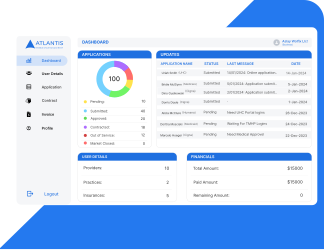
Real-Time Client Report Portal
Access real-time insights into your billing performance with our secure Client Report Portal.Track claims, payments, denials, and KPIs anytime—transparency at your fingertips.
Contact Us